Monday, October 08, 2007

Unexceptional Dictionary Accesses in C#

Take a look at this:

            Dictionary<string, string> dictionary = new Dictionary<string, string>();

            dictionary["Hello"] = "World!";

            Console.WriteLine(dictionary["Hello"]);

            Console.WriteLine(dictionary["Goodbye"]);


What's the output of this code? You might think that you'd get the word "World!" followed by a blank line, but that's wrong. You get this big hairy exception:

System.Collections.Generic.KeyNotFoundException: The given key was not present in the dictionary.
at System.ThrowHelper.ThrowKeyNotFoundException()
at System.Collections.Generic.Dictionary`2.get_Item(TKey key)

I don't really like that exception at all. I find that it's usually quite unexceptional for something to be missing from a dictionary. You might think it would be nice to get a null back instead of getting an exception. I might agree with you. OK, but maybe they had a reason for making the dictionary behave this way. Think about this situation:

            Dictionary<int, int> dictionary = new Dictionary<int, int>();

            dictionary[1] = 2;

            Console.WriteLine(dictionary[1]);

            Console.WriteLine(dictionary[2]);


Now, what do you think? Still want a null back? Integers aren't reference types, and you should never be getting null when something is supposed to return an integer. You might think that could just return default(T) but in this case the return value would be zero. But, zero is a perfectly valid number so it probably would have been a bad design decision to have the dictionary return default(T). So we're left with this exception.

You might attempt to fix this by guarding all your dictionary accesses with ContainsKey() checks like so:

            Dictionary<string, string> dictionary = new Dictionary<string, string>();

            dictionary["Hello"] = "World!";

            if (dictionary.ContainsKey("Hello"))

                Console.WriteLine(dictionary["Hello"]);

            if (dictionary.ContainsKey("Goodbye"))

                Console.WriteLine(dictionary["Goodbye"]);


There's a few of problems with this approach, however. First of all, it looks ugly, and it's really verbose. What if you're retrieving a large number of values from this dictionary? All those ifs get really tedious, and there's more potential for error when you're providing the key twice to the dictionary. Also, there's a potential race condition here. What if another thread removes the key from the dictionary the instant after you confirm that it is in fact in the dictionary, and then try to retrieve the value for the key? You're going to get an exception. And yet another problem is that this solution is inefficent. The dictionary has having to perform the work to lookup the key twice instead of just once.

So if you can't guard the dictionary access with an if, how can you safely determine if a key is in a dictionary and retrieve its value while avoiding a race condition? Well, they thought of that. That's why they created TryGetValue(), which basically works like this:

            Dictionary<string, string> dictionary = new Dictionary<string, string>();

            dictionary["Hello"] = "World!";

            string value;

            if (dictionary.TryGetValue("Hello", out value))

            {

                Console.WriteLine("Dictionary has the key!");

                Console.WriteLine("The value is " + value);

            }

            else

            {

                Console.WriteLine("Dictionary doesn't have the key!");

            }


So this solves that latter two problems of the three problems I mentioned above about the guard clauses, but it really exacerbates the first problem of verbosity. So how can we fix this? What if you really just want to get an null back if the key was missing from the dictionary? As mentioned before, you'd only want to do this if your value type was a reference type. How would you get about it? You could create a helper function like this:

        public string GetValueSafelyFromDictionary(Dictionary<string, string> dictionary, string key)

        {

            string value;

            if (dictionary.TryGetValue(key, out value))

                return value;

            return null;

        }


Or more generally:

        public TValue GetValueSafelyFromDictionary<TKey, TValue>(Dictionary<TKey, TValue> dictionary, TKey key) where TValue : class

        {

            TValue value;

            if (dictionary.TryGetValue(key, out value))

                return value;

            return null;

        }


So this could definitely helps cut down on the verbosity, especially if the value from dictionary is supposed to go into the property of another reference type instead of some variable on the stack. But it's quite annoying to have to keep passing the dictionary, so let's make this better:

    public class DictionaryValueGetter<TKey, TValue> where TValue : class

    {

        private readonly IDictionary<TKey, TValue> _dictonary;


        public DictionaryValueGetter(IDictionary<TKey, TValue> dictonary)

        {

            _dictonary = dictonary;

        }


        public TValue this[TKey key]

        {

            get

            {

                TValue value;

                if (!_dictonary.TryGetValue(key, out value))

                    return null;

                return value;

            }

        }

    }


OK, this is a lot better. Take a look:

            Dictionary<string, string> dictionary = new Dictionary<string, string>();

            dictionary["Hello"] = "World!";

            DictionaryValueGetter<string, string> valueGetter = new DictionaryValueGetter<string, string>(dictionary);

            Console.WriteLine(valueGetter["Hello"]);

            Console.WriteLine(valueGetter["Goodbye"]);


And this will work with any dictionary where your "value" type is a reference type, which is perfect because that's the only time this solution makes any sense. We could have gone further than this solution and provided a full implementation of IDictionary that provided all of this behavior, but I think that was a bit too much work for my simple use case.

Friday, September 28, 2007

Improving Performance of ActiveRecord and NHibernate for Large Queries

First off, let me say that in general I think that NHibernate is fast enough for most use cases. And as always, save optimizations for last and use a profiling tool to tell what actually is taking up the most time instead of guessing what you think is taking up the most time.

With that said, there are occasions when you need to put a little extra thought into improving performance. A web application I'm working executes a database query that can return thousands of rows. I really wasn't pleased with the performance of the application for this use case. It took a longer than I wanted it to take, especially given that this query is run frequently by the application's users. I ran the NHibernate-emitted SQL query inside of SQL Server Management Studio, and the query returned nearly instantly, so that got me thinking.

I busted out the profiler. I'm using JetBrain's dotTrace profiling tool for .NET, which is a great tool. I loaded up my application to the view where I kick off this large query, turned on the profiling, and then let it run. Here are the results:


NHibernate is spending a lot of time determining whether or not it needs to flush changes to the results of my query to the database. In this specific use case however, no modifications will be made to these entities, so this check is just a waste of resources. It took this much time not to actually update the database with anything, but rather just to see if it should being doing any updates.

For those that don't know, NHibernate follows the unit of work pattern. All changes made to objects are not immediately flushed to the database (via INSERTs and UPDATEs.) Instead, NHibernate patiently waits for you to tell it that your session is over (or manually tell it to flush) before it starts updating the database.

There are a couple of ways to stop NHibernate from spending this much time on the flush. You can either evict all the objects that you don't want checked for a flush from the session, or you can just tell the session not to flush when closed. The latter option will not work if you actually make modifications to some other objects while using the same session, but I'm not making any changes to these objects, so that's fine with me. If you're using Castle ActiveRecord like I am, you can add an argument when you create the SessionScope surrounding your query to turn off flushing:

            using (new SessionScope(FlushAction.Never))

            {

                // Large query inside here

            }


Normally, the SessionScope is initialized with FlushAction.Auto, which causes NHibernate to perform the flush check at the end of a session.

As I said before, another option is to evict the objects that came from the query out of the session. In NHibernate, you can use the ISession.Evict() method to perform this action. Since I'm using ActiveRecord, I shy away from dealing with NHibernate directly whenever possible, so that is yet another reason I chose not to go this route.

Now that we've told NHibernate not to flush anything, and therefore not to check for something to flush, the performance has increased. Take a look:


After I made my changes, NHibernate did not perform any flushes during this request.

NHiberate and ActiveRecord are great tools and they make tedious data-driven tasks simple and easy, but it helps to know a little bit about what's going on under the hood. The takeaway from this is that you should look for opportunies to avoid triggering NHibernate's flush mechanism if you know an operation is read-only, especially when you're dealing with lots of entities in the session.

Saturday, September 22, 2007

Elegantly Retry Code If There's an Error

Sometimes you want to try to retry code if there's an error. The most applicable situation for this might be when a database is busy or when the network is slow. Here's some sample code:

        public void RetryFiveTimes()

        {

            for (int count = 0; count < 5; count++)

            {

                try

                {

                    CodeThatCouldThrowAnError();

                    break;

                }

                catch (Exception)

                {

                }

            }

        }


This seems like a decent first attempt solution, until you find yourself doing this in multiple places. Plus I just don't like the way this looks at all. Let's try a different approach:

        public void RetryFiveTimes()

        {

            Retry.Times(5).Do(delegate { CodeThatCouldThrowAnError(); });

        }


OK, now I'm happier. Let's take a look at the Retry class:

    public delegate void RetryMethod();


    public class Retry

    {

        private int _times;


        public static Retry Times(int times)

        {

            Retry retry = new Retry();

            retry._times = times;

            return retry;

        }


        public void Do(RetryMethod method)

        {

            for (int count = 0; count < _times; count++)

            {

                try

                {

                    method();

                    break;

                }

                catch (Exception)

                {

                }

            }

        }

    }


This Retry class could probably benefit from some improvements. The first thing that comes into my head is the ability to retry for specific exceptions. So let's improve this code a bit:

    public delegate void RetryMethod();


    public class Retry

    {

        private Type _type = null;

        private int _times;


        public static Retry Times(int times)

        {

            Retry retry = new Retry();

            retry._times = times;

            return retry;

        }


        public Retry When<T>() where T : Exception

        {

            _type = typeof(T);

            return this;

        }


        public void Do(RetryMethod method)

        {

            for (int count = 0; count < _times; count++)

            {

                try

                {

                    method();

                    break;

                }

                catch (Exception e)

                {

                    if (_type != null && !_type.IsAssignableFrom(e.GetType()))

                        throw e;

                }

            }

        }

    }


Cool, now we can do this:

        public void RetryFiveTimesWhenTheresATimeoutException()

        {

            Retry.Times(5)

                .When<TimeoutException>()

                .Do(delegate { CodeThatCouldThrowAnError(); });

        }


Of course, we don't always have nice exceptions where the type indicates that it was a timeout error. What if the message of the exception contained the information we needed? We could probably add further facilities for the user to inspect the exception and provide feedback as to whether we should continue. Let's try this:

    public class Retry

    {

        private Predicate<Exception> _shouldRetry;

        private Type _type = null;

        private int _times;


        public Retry()

        {

            _shouldRetry = DefaultShouldRetry;

        }


        public static Retry Times(int times)

        {

            Retry retry = new Retry();

            retry._times = times;

            return retry;

        }


        public Retry When<T>() where T : Exception

        {

            _type = typeof(T);

            return this;

        }


        public Retry If(Predicate<Exception> predicate)

        {

            _shouldRetry = predicate;

            return this;

        }


        private bool DefaultShouldRetry(Exception e)

        {

            if (_type == null)

                return true;

            if (!_type.IsAssignableFrom(e.GetType()))

                return false;

            return true;

        }


        public void Do(RetryMethod method)

        {

            for (int count = 0; count < _times; count++)

            {

                try

                {

                    method();

                    break;

                }

                catch (Exception e)

                {

                    if (!_shouldRetry(e))

                        throw e;

                }

            }

        }

    }


Great, now we can do this type of thing:

        public void RetryFiveTimesWhenTheresAnExceptionWithTimeoutInItsMessage()

        {

            Retry.Times(5)

                .If(delegate(Exception e) { return e.Message.Contains("Timeout"); })

                .Do(delegate { CodeThatCouldThrowAnError(); });

        }


OK, that's good enough for now. We could continue with this forever, but this solution seems pretty flexible. I think this is a pretty good example of a fluent interface as well.

Tuesday, September 18, 2007

Have Log4Net Send an Email When an Error Occurs

Instead of building up your own error notification system and injecting an email sender, you can easily have Log4Net send you an email when you want to be notified of something.

        public void DoSomethingImportant()

        {

            try

            {

                InternalDoSomethingImportant();

            }

            catch (Exception e)

            {

                _logger.Error("A serious error occured.", e);

            }

        }


Now, instead of passing in an IEmailSender here and calling SendMessage(), try setting this up in your Log4Net configuration:

<?xml version="1.0" encoding="utf-8" ?>

<log4net>

  <appender name="SmtpAppender" type="log4net.Appender.SmtpAppender">

    <threshold value="WARN"/>

    <to value="to@emailaddress.com" />

    <from value="from@emailaddress.com" />

    <subject value="SmtpAppender" />

    <smtpHost value="SmtpHost" />

    <bufferSize value="512" />

    <lossy value="false" />

    <layout type="log4net.Layout.PatternLayout">

      <conversionPattern value="%newline%date [%thread] %-5level %logger [%property{NDC}] - %message%newline%newline%newline" />

    </layout>

  </appender>

  <root>

    <level value="ERROR"/>

  </root>

</log4net>


Of course, you probably will have more configuration than this, but this is the bare minimum if you want to be emailed of errors. Don't forget about the FATAL log level as well. You could very easily change the level of the message that you wanted to be notified of via email.

I've set the appender threshold of the SmtpAppender here to WARN. You can make sure that you don't get any emails of lower priority using this setting in more advanced Log4Net configurations.

Monday, September 17, 2007

Five Essential Development Tools

  1. Resharper - Make quick work of refactoring and code generation with this addon to Visual Studio. It costs a bit of money but it's well worth the price. I won't use Visual Studio without this addon.
  2. TortoiseSVN - You should be using source control. This subversion interface makes managing your working copy of your code easy and painless.
  3. WinMerge - This is best free diff tool that I have found for Windows.
  4. Notepad2 - This free text editor is much better than the Notepad application that comes with windows.
  5. Paint.NET - Every programmer at some point has to engage in some minor graphics manipulation. I mainly use this to change image formats and crop images.

Tuesday, July 31, 2007

Enable MARS on your NHibernate connection if you have SQL Server 2005

If you don't enable MARS, you'll get exceptions like these every now and then under high load:

Exception: There is already an open DataReader associated with this Command which must be closed first.
Stack Trace:
at System.Data.SqlClient.SqlInternalConnectionTds.ValidateConnectionForExecute(SqlCommand command)
at System.Data.SqlClient.SqlConnection.ValidateConnectionForExecute(String method, SqlCommand command)
at System.Data.SqlClient.SqlCommand.ValidateCommand(String method, Boolean async)
at System.Data.SqlClient.SqlCommand.RunExecuteReader(CommandBehavior cmdBehavior, RunBehavior runBehavior, Boolean returnStream, String method, DbAsyncResult result)
at System.Data.SqlClient.SqlCommand.RunExecuteReader(CommandBehavior cmdBehavior, RunBehavior runBehavior, Boolean returnStream, String method)
at System.Data.SqlClient.SqlCommand.ExecuteReader(CommandBehavior behavior, String method)
at System.Data.SqlClient.SqlCommand.ExecuteDbDataReader(CommandBehavior behavior)
at System.Data.Common.DbCommand.System.Data.IDbCommand.ExecuteReader()
at NHibernate.Impl.BatcherImpl.ExecuteReader(IDbCommand cmd)
at NHibernate.Loader.Loader.GetResultSet(IDbCommand st, RowSelection selection, ISessionImplementor session)
at NHibernate.Loader.Loader.DoQuery(ISessionImplementor session, QueryParameters queryParameters, Boolean returnProxies)
at NHibernate.Loader.Loader.DoQueryAndInitializeNonLazyCollections(ISessionImplementor session, QueryParameters queryParameters, Boolean returnProxies)
at NHibernate.Loader.Loader.LoadCollection(ISessionImplementor session, Object id, IType type)

To enable MARS, just add this on to our connection string:

MultipleActiveResultSets=true

Tuesday, July 10, 2007

MonoRail Exception Chaining

MonoRail comes with a nice exception handling mechanism. It's pretty well documented so I won't explain how it works.

MonoRail also provides an handler that sends an email with exception and request details. I got tired of getting this email in my development environment, so here's what I came up with:

    public class ExceptionFilterHandler : AbstractExceptionHandler

    {

        public override void Process(IRailsEngineContext context)

        {

            if (context.Request.IsLocal)

                return;


            InvokeNext(context);

        }

    }


Pretty simple and it does the trick. This also gives you the ability login to the server in production if you have access and see the exception detail in the browser instead of getting an email. It checks to see the web request was made from the local machine.

Disregard the previous post

For some reason, the code I posted below doesn't work anymore. I don't have the time to see what changed. Hopefully soon I'll get a chance to revisit it and see what happened to MicroKernel that made the code stop working.

Wednesday, May 09, 2007

Exploring Castle Windsor/MicroKernel Auto-wiring

Castle Windsor/MicroKernel is a great tool for dependency injection. For most applications, the auto-wiring features of MicroKernel will perfectly for the your situation out-of-the-box. However, imagine a scenario where the dependencies of some components are services defined by an interface, while the dependencies of other components depend not on the interface, but rather on the specific implementation. Let's explore how we can get MicroKernel to help us out. So let's say we have this interface:

    public interface ISender

    {

        void SendMessage(string recipient, string message);

    }


and we have a couple of implementations:

    public class EmailSender : ISender

    {

        public void SendMessage(string recipient, string message)

        {

            // ... send email message ...

        }

    }


    public class InstantMessageSender : ISender

    {

        public void SendMessage(string recipient, string message)

        {

            // ... send instant message ...

        }


        public bool IsOnline(string recipient)

        {

            // ... check is user is online ...

            return false;

        }

    }


Suppose we have a component that requires a set a ISender services:

    public class AlertSystem

    {

        private ISender[] _senders;


        public AlertSystem(ISender[] senders)

        {

            _senders = senders;

        }


        public ISender[] Senders

        {

            get { return _senders; }

        }


        /// ... implementation ...

    }


OK, so far so good. Wiring this up with Windsor is a piece of cake:

<?xml version="1.0" encoding="utf-8" ?>

<configuration>

  <components>

    <component id="instant.message.sender"

              service="Eg.ISender, Eg"

              type="Eg.InstantMessageSender, Eg"/>

    <component id="email.sender"

              service="Eg.ISender, Eg"

              type="Eg.InstantMessageSender, Eg"/>

    <component id="alert.system"

              type="Eg.AlertSystem, Eg">

      <parameters>

        <senders>

          <array type="Eg.ISender, Eg">

            <item>${instant.message.sender}</item>

            <item>${email.sender}</item>

          </array>         

        </senders>

      </parameters>

    </component>

  </components>

</configuration>


But what if I have another component that requires a specific implementation of ISender like this:

    public class InstantMessageComponent

    {

        private InstantMessageSender _sender;


        public InstantMessageComponent(InstantMessageSender sender)

        {

            _sender = sender;

        }


        public InstantMessageSender Sender

        {

            get { return _sender; }

        }


        // ... implementation ...

    }


How can we get this wired up? Well, you might think just added the new component would work:

<?xml version="1.0" encoding="utf-8" ?>

<configuration>

  <components>

    <component id="instant.message.sender"

              service="Eg.ISender, Eg"

              type="Eg.InstantMessageSender, Eg"/>

    <component id="email.sender"

              service="Eg.ISender, Eg"

              type="Eg.InstantMessageSender, Eg"/>

    <component id="alert.system"

              type="Eg.AlertSystem, Eg">

      <parameters>

        <senders>

          <array type="Eg.ISender, Eg">

            <item>${instant.message.sender}</item>

            <item>${email.sender}</item>

          </array>

        </senders>

      </parameters>

    </component>

    <component id="instant.message.component"

              type="Eg.InstantMessageComponent, Eg"/>

  </components>

</configuration>


However, there is a slight problem with this. MicroKernel will not auto-wire components that have a dependency of InstantMessageSender because it is instead registered in the config for the service it provides, namely ISender. In this case, I can force the kernel to wire it up using the following configuration:

<?xml version="1.0" encoding="utf-8" ?>

<configuration>

  <components>

    <component id="instant.message.sender"

              service="Eg.ISender, Eg"

              type="Eg.InstantMessageSender, Eg"/>

    <component id="email.sender"

              service="Eg.ISender, Eg"

              type="Eg.InstantMessageSender, Eg"/>

    <component id="alert.system"

              type="Eg.AlertSystem, Eg">

      <parameters>

        <senders>

          <array type="Eg.ISender, Eg">

            <item>${instant.message.sender}</item>

            <item>${email.sender}</item>

          </array>

        </senders>

      </parameters>

    </component>

    <component id="instant.message.component"

              type="Eg.InstantMessageComponent, Eg">

      <parameters>

        <sender>${instant.message.sender}</sender>

      </parameters>

    </component>

  </components>

</configuration>


This works, but it's not autowired. If you have a lot of this going on in your system, you'll find yourself taking on more and more of the responsibility of wiring your components, even though you originally wanted to leverage MicroKernel to handle much of this for you. So let's say we want our configuration to look like the first configuration I presented. Well, we're going to have to change the way MicroKernel registers services. This concern is specifically handled via the NamingSubSystem. We will do the job by extending MicroKernel's default INamingSubSystem implementation, DefaultNamingSubSystem:

    public class CustomNamingSubSystem : DefaultNamingSubSystem

    {

        public override void Register(string key, IHandler handler)

        {

            Type implementation = handler.ComponentModel.Implementation;


            if (!service2Handler.Contains(implementation))

            {

                this[implementation] = handler;

            }


            base.Register(key, handler);

        }

    }


In this method, all we're doing is additionally adding the implementation to resolvable services if it isn't already. The DefaultNamingSubsystem only adds the service and not the implementation except in cases where you don't specify a service. Also note that this method should also take care of mapping the component id to the proper component. Here's the default implementation:

        public virtual void Register(String key, IHandler handler)

        {

            Type service = handler.ComponentModel.Service;


            if (key2Handler.Contains(key))

            {

                throw new ComponentRegistrationException(

                    String.Format("There is a component already registered for the given key {0}", key));

            }


            if (!service2Handler.Contains(service))

            {

                this[service] = handler;

            }


            this[key] = handler;

        }


And here's how I got Windsor to use my new DefaultNamingSubSystem:

    public class ApplicationContainer : WindsorContainer

    {

        public ApplicationContainer(string xmlFile) : base(xmlFile)

        {

        }


        protected override void RunInstaller()

        {

            Kernel.AddSubSystem(SubSystemConstants.NamingKey, new CustomNamingSubSystem());

            base.RunInstaller();

        }

    }


By the way, we could have gotten this all wired up if we registered the implementations twice: once for the service it provides and another time for the implementation, like this:

<?xml version="1.0" encoding="utf-8" ?>

<configuration>

  <components>

    <component id="instant.message.sender.service"

              service="Eg.ISender, Eg"

              type="Eg.InstantMessageSender, Eg"/>

    <component id="email.sender.service"

              service="Eg.ISender, Eg"

              type="Eg.InstantMessageSender, Eg"/>

    <component id="alert.system"

              type="Eg.AlertSystem, Eg">

      <parameters>

        <senders>

          <array type="Eg.ISender, Eg">

            <item>${instant.message.sender}</item>

            <item>${email.sender}</item>

          </array>

        </senders>

      </parameters>

    </component>   

    <component id="instant.message.component"

              type="Eg.InstantMessageComponent, Eg"/>

    <component id="instant.message.sender"

              type="Eg.InstantMessageSender, Eg"/>

    <component id="email.sender"

              type="Eg.InstantMessageSender, Eg"/>

  </components>

</configuration>


I wouldn't recommend this approach though.

Monday, May 07, 2007

Compressing SQL Server Backups With Windows PowerShell and 7-zip

We run monthly full backups, daily differential backups, and transaction log backups every hour. The backup drive fills up quickly. So I decided that I wanted to compress all of the .bak and .trn files into their own .7z files using 7-zip. Doing something like this in a bash shell is trivial. Windows PowerShell makes it trivial as well (as long as you have it installed). Here's what I did:


get-childitem -recurse |
where { $_.extension -match ".(bak|trn)" -and
-not (test-path ($_.fullname -replace "(bak|trn)", "7z")) } |
foreach { F:\7za.exe a ($_.fullname -replace "bak", "7z") $_.fullname }


Here's a breakdown of what's going on:

get-childitem -recurse: Retreives all files recursively from the current directory

where { $_.extension -match ".(bak|trn)" -and -not (test-path ($_.fullname -replace "(bak|trn)", "7z")): Filters the filelist to only include files that end in .bak and .trn and also where there isn't already a file with the same name but with an extension of .7z

foreach { F:\7za.exe a ($_.fullname -replace "bak", "7z") $_.fullname }: Run the 7za.exe command line utility to add the .bak or .trn into a .7z file.

After this command completed, I ran the following command to remove all of the original .bak or .trn files if they have a corresponding .7z file:


get-childitem -recurse |
where { $_.extension -match ".(bak|trn)" -and
(test-path ($_.fullname -replace "(bak|trn)", "7z")) } |
foreach { del $_.fullname }


By the way, the 7-zip command line utility is good about deleting .7z files that were not properly created (e.g. you cancelled the compression before it finished.)

Saturday, May 05, 2007

Finding Good Developers

I will very soon have the need to find qualified software developers for an upcoming large project. I've tried to hire software developers before, but I think I must be going about this the wrong way.

I've tried the Monster approach, but I mainly got a group of unqualified developers that didn't have command of what I specifically stated as a requirement for the job. For example, if I put that knowing SQL is a requirement, I expect you to know at a minimum how to write SELECT, INSERT, UPDATE, etc. statements without having to Google it. It was surprising how many of the candidates failed to meet this requirement.

In addition, I received a bunch of emails from staffing agencies that wanted to charge us 2x-3x the amount that the developer they were pitching was going to end up making. The facts that I know we're overpaying and that I've had a very bad experience with these staffed developers in the past really make me want to avoid this route.

I guess I'll just have to get lucky when I start looking again. I don't mind teaching sharp guys new concepts, but even finding them is next to impossible it seems. Anyway, if you're in the Houston area and looking, definitely drop me a line.

Wednesday, May 02, 2007

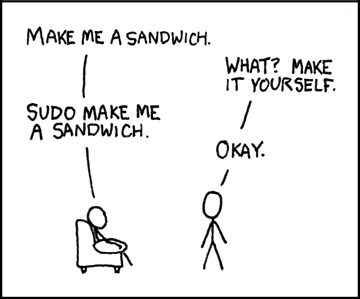
One of the Funniest Comics Ever


I couldn't stop laughing when I saw this. There's lots more at XKCD.

Tuesday, May 01, 2007

Top Down vs. Bottom Up

I used to start building new applications by writing the model and persistence layer. I'd flush out my model, then build the persistence on top, and then go about writing the view. I will not likely use this approach ever again.

I'm currently working on a MonoRail application where I'm taking a different approach. I've been start at the controller and view level and been working downward. When I reach a point where I need to work with the model and persistence, I instead define an interface and an appropriate model that would be ideal for the specific use case I'm working on.

I've found myself stubbing out implementations to these interfaces, instead of actually creating the database and persistence logic. A huge win that I've found is that I'm able to test the web application without a database! It makes changes and refactoring take a fraction of the time because I don't have to worry about updating the ORM mapping, database tables, etc. I also save myself from writing unneeded functionality in the model and persistence layer. But being able to see the application interface using mock data and not ever actually hitting the database have both been a huge benefit. The time to do a write/compile/test cycle has been greatly reduced. I have less code in my codebase that I'm not actually using.

I believe this approach matches the TDD style of development a bit better than what I'm used to doing as well. Write the API that want to use from the top down, not the API that you think you'll use from the bottom up.

My inspiration was this post was list of best practices that John-Paul S. Boodhoo jotted down about a course he was taking. There's lots of other great stuff his notes as well.